
Blog
Writing content for your website
Structure, readability and images: what makes people read to the end.
- 14 September 2026
- 16 min read

Articles
Writing content for your website
When someone sends us a page saying “the copy is there, but there are no leads and no rankings,” we almost always see the same picture. A two-screen wall of text with no subheadings. The first paragraph is company history, while the answer the visitor came for is buried in the middle. Four-megabyte photos named IMG_4512.jpg. Formally, the content is there. In reality, nobody reads it, and the search engine can’t tell who the page is for.
Good website content isn’t “nicely written text.” It’s a page built around a specific job the reader needs done: find the answer fast, feel confident they can trust you, and take the next step. Below is how we prepare this kind of material at WebTerra — from understanding search intent to structure, readability, images, and signals of expertise. In the same order we recommend you work in.
Start with intent, not with the text
The most expensive content mistake happens before the first sentence is written: the page is created in a format the visitor doesn’t expect. Behind every query there is an intent — informational, commercial, transactional, or navigational. Someone searching “how to choose laminate flooring” wants to understand the topic, not land straight in a catalog. Someone searching “AC5 laminate flooring price” has already decided and is comparing offers — they need products, prices, and delivery terms, not a lecture.
The simplest way to identify intent is to look at what already ranks for the query. If the top spots are articles and guides, the query is informational, and a service page is unlikely to get there. If it’s catalogs and product pages, an article won’t win. We run this check for every new page before writing the brief.
| Intent type | Example query | Page format that works |
|---|---|---|
| Informational | how to care for a leather sofa | Article, how-to guide, step-by-step walkthrough |
| Commercial | best robot vacuum for an apartment | Review, comparison, roundup with a table |
| Transactional | order a landing page design | Service or product page with pricing and a form |
| Navigational | brand name + contacts | Contact page, company or branch page |
One page — one primary intent and one group of closely related queries. If you try to make a single article cover both “what is it” and “buy cheap,” you end up with text that answers neither question well. We explained in detail how to collect queries and map them to pages in “Building a keyword map”.
Then we write a short brief: who the reader is, the one question they should have answered by the end, and the next action we want. Five minutes that cut half the unnecessary text before it’s written.
Structure: the answer first, details after
People online don’t read pages top to bottom. They spend a few seconds judging whether the answer is here, then stay or bounce. So we use the inverted pyramid: essentials first, then explanation, then details for those who want more.
In practice, this means the first two paragraphs must say what the page is about and what the reader will get from it. No “in today’s fast-paced world” and no company history. If someone is searching for how long paint takes to dry, the very first paragraph should contain the number — and only then what it depends on.
Heading hierarchy
Headings are the skeleton of a page. For people, they work as a table of contents they can scan quickly. For search engines, they’re a hint about which meaningful blocks the text consists of. The rules we follow:
- One H1 per page. It matches the title tag in meaning and names the topic honestly.
- H2s are the main sections. Each one answers a separate sub-question of the topic. Reading only the H2s, a person should understand what the piece covers.
- H3s are subsections inside an H2. Don’t jump from H1 straight to H3, and don’t use headings just to get a bigger font.
- Headings are informative. “How much it costs” beats “Pricing,” and “Why paint cracks” beats “Nuances.”
- No keyword stuffing. The key phrase belongs in the H1 and maybe one or two H2s, not in every heading in a row.
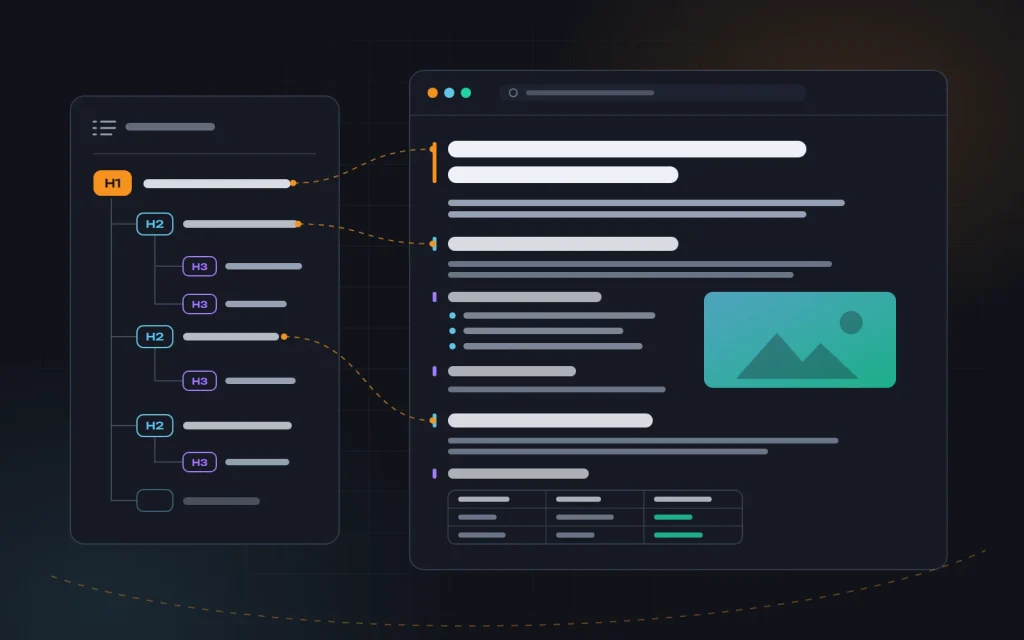
A simple test we recommend to everyone: copy only the page’s headings onto a separate sheet. If that list doesn’t make it clear what the text is about and in what order it covers the topic, the structure needs rebuilding — not the sentences editing.
Readability: write for scanning
Eye-tracking research showed long ago that on text-heavy pages, the gaze most often follows an F-shaped pattern. A person reads the first line or two, then slides down the left edge, catching on paragraph openings, subheadings, bold words, and lists. So the goal is to make sure that even a “scanning” reader picks up the key ideas.
Here’s what works for this in our projects:
- Short paragraphs. Three to five sentences, one idea. On a smartphone, a ten-line paragraph turns into a wall that people simply scroll past.
- The first sentence of a paragraph carries the point. The rest is explanation. Someone who reads only the paragraph openings still gets the essentials.
- Lists instead of comma-separated enumerations. Process steps go in a numbered list; items of equal weight go in a bulleted one.
- Tables for comparisons. If you’re comparing three options across four criteria, a table reads many times faster than prose.
- Restrained emphasis. Bold a few key phrases per screen, not half the text. When everything is highlighted, nothing is.
- Plain sentences and real examples. Instead of “enables process optimization,” say what exactly changes for the client and how they’ll notice it.
We also watch the language. Jargon, passive voice, and abstract phrasing slow down even specialists. We ask authors to write the way they’d explain it to a client over the phone, then cut. Necessary terms stay, explained on first use.
A word about length. Search engines don’t count words — they assess how completely a page answers the query. Look at how deeply the leading pages cover the topic, and make yours more useful, not longer. Padding undermines exactly what you wrote it for.
Don’t forget about layout either. A line length of 60–80 characters, generous line spacing, text that contrasts with the background, and a font size that’s comfortable to read on a phone without zooming. Most visitors now arrive on smartphones, so that’s where you should check the page first. More on this in “Succeeding with mobile-first indexing”.
What keeps people reading to the end
Getting people to finish a page takes more than short paragraphs. A long piece holds attention when readers can constantly see that they’re moving forward and getting value. A few techniques we use in guides and long-form articles:
- A table of contents with anchor links at the top of a long piece — readers immediately see what’s ahead and can jump to the section they need.
- Visual rhythm. Every one or two screens, something that breaks the monotony: a list, a table, a diagram, a highlighted tip, or an example.
- Specifics instead of promises. Every section should give the reader something they can use: a step, a number, a check, a template.
- Intermediate calls to action. Not just a button at the very end, but a relevant link or offer at the point where the reader arrives at the matching need.
- An honest ending. A short summary or checklist the reader can save — and a clear next step.
Check this against data, not gut feeling: scroll depth and time on page show the screen where readers drop off. That’s the section to shorten, move, or rewrite.
Images: purpose, alt text, formats, and sizes
An illustration should explain, not decorate. A process diagram, a screenshot, a photo of a real result, a before-and-after comparison — these hold attention and aid understanding. A stock photo of smiling people in headsets adds only weight. We place images next to the text they illustrate, with a one-sentence caption: captions get read far more often than paragraphs.
Alt text and file names
The alt attribute is the text replacement for an image. Screen readers read it aloud, search engines see it, and it appears if the image fails to load. Good alt text briefly describes what’s shown and why: “Diagram of an article structure with an H1, three H2 sections, and H3 subsections.” Bad alt text is empty, says “image,” or lists comma-separated keywords. Purely decorative elements get an empty alt="" so they don’t get in the way of people using screen readers.
File names should also be meaningful: article-structure-headings.webp instead of IMG_4512.jpg. It’s a small detail, but it helps image search and keeps the media library in order.
Formats
| Format | When to use it | Notes |
|---|---|---|
| WebP | Photos and illustrations by default | Noticeably lighter than JPEG at the same quality, supported by all modern browsers |
| AVIF | Large photos where every kilobyte counts | Even more compact, but slower to encode; best served with a fallback |
| JPEG | Fallback for photos | Universal, but heavier than modern formats |
| PNG | Interface screenshots, graphics with transparency | Too heavy for photos |
| SVG | Logos, icons, simple diagrams | Vector, sharp on any screen, very small |
Sizes and loading
The most common audit finding: a 4,000-pixel photo straight from a phone, dropped into an 800-pixel text column. The browser downloads several times more data than it can display, and the page crawls on mobile data.
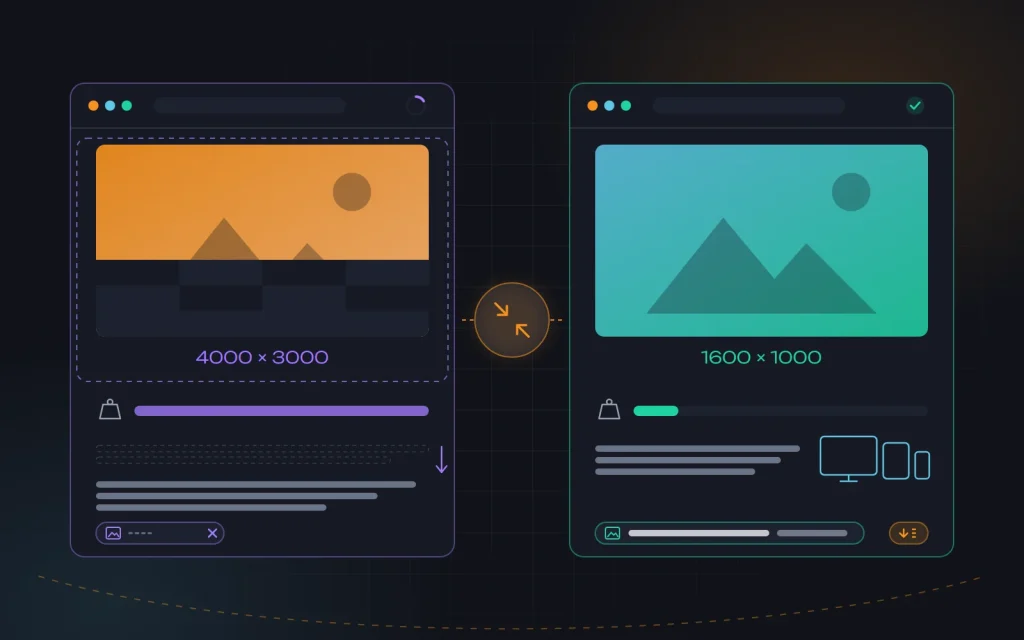
Our working routine for every image:
- Crop out what isn’t needed and scale it down to the actual display width, with some headroom for high-density screens.
- Convert to WebP or AVIF and compress at a sensible quality setting — the difference is usually invisible to the eye.
- Prepare several sizes and serve them via
srcsetandsizes, so a phone doesn’t download the version meant for a wide monitor. - Set
widthandheightso the layout doesn’t jump while loading. - Add
loading="lazy"to everything below the first screen — but not to the main image, which should instead load as early as possible.
All of this directly affects speed and Core Web Vitals — and therefore whether a visitor waits long enough to see your text at all. If a site has already accumulated hundreds of heavy images, there’s no way to redo them by hand; automated processing helps here, and we set it up as part of our website speed optimization service.
E-E-A-T: why people should believe you
Google’s search quality rater guidelines describe content quality through experience, expertise, authoritativeness, and trustworthiness (E-E-A-T). It isn’t a “ranking factor” you can tweak with one tag, but a set of signals people and algorithms use to judge whether a page can be relied on. They matter most in health, finance, and legal topics, but work in any niche.
- Experience. Show that you’ve actually done what you’re writing about: your own photos, screenshots, descriptions of real situations and mistakes. Generic text “from the internet” can’t provide that.
- Expertise. Name the author with a short bio: who they are, what they do, why they know the subject. For complex topics, add a reviewing specialist.
- Authoritativeness. Cite primary sources: standards, documentation, official data. External mentions of your company also feed this signal.
- Trust. Full contact details, an About page, clear terms, a secure connection, publication and update dates, and corrected factual errors.
Freshness matters too. We review key content every few months, updating prices, steps, and screenshots. An article describing a long-gone menu loses both trust and rankings.
As for AI-generated text: it isn’t banned, but a page without first-hand experience and verified facts is no different from hundreds of others. We use such tools for drafts and outlines; the substance always comes from people who do the work.
Metadata and internal linking
Even the best text needs the right “packaging.” The title tag should be up to 60 characters, with the main query near the start and a clear benefit. The meta description is one or two sentences explaining what the visitor will find on the page: it doesn’t affect rankings directly, but it does affect clicks. The URL should be short and readable. More on the technical side in “On-page SEO basics”.
We place internal links where they help the reader: to a deeper piece, a related topic, or a service page once the need arises. Anchor text should describe where the link leads — “more on catalog structure,” not “here.” Three to six relevant links per article is normal. Twenty links in every paragraph is not.
What this looks like in practice
A typical situation: a renovation company has a “Turnkey bathroom renovation” page. Five paragraphs of generic claims about quality, no subheadings, “price on request,” and two stock photos of bathrooms the company never built. The page has sat on page two or three for years, and visitors leave quickly.
We start with the search results: the top spots go to pages with ballpark prices, project stages, and photos of completed work. So we rebuild the page around that intent. At the top — a short answer: what the renovation includes, what drives the cost, and how long it takes. Then the stages as a numbered list, a table of approximate prices by type of work, real before-and-after photos with captions and meaningful alt text, a section on who manages the projects, answers to common questions, and a clear “request an estimate” button. We resize the photos and convert them to WebP — the page becomes several times lighter.
Results don’t show up overnight. First, time on page and scroll depth grow; then the number of queries the page appears for, and inquiries. Figures depend on the niche, so we don’t promise them — but the direction is always visible.
Five mistakes we see most often
- Text written “for the robot.” Keywords in every sentence, awkward phrasing. Modern search understands synonyms, and people simply close such pages.
- An intro that fills half the screen. The answer is buried in the middle, and most readers never get there.
- Headings used for styling. H2s are used for a bigger font, while the real sections are left without headings.
- Heavy images without alt text. The page loads slowly, and neither search engines nor screen readers understand what the images show.
- Publish and forget. The content ages, facts change, but the date and the substance stay exactly as they were on publication day.
A quick pre-publication checklist
- The page format matches what the search results show for the main query.
- The answer to the core question is in the first two paragraphs.
- One H1, logical H2s and H3s that make the page’s content clear.
- Paragraphs of up to five sentences, with lists and tables wherever there’s something to compare.
- Images are compressed, in a modern format, with dimensions, meaningful alt text, and a caption.
- The author, the update date, and sources for facts are visible.
- The title and meta description are written by hand; the URL is short.
- There are 3–6 relevant internal links and a clear next action.
- The page has been reviewed on a smartphone.
Frequently asked questions
How long should the text be?
Long enough to answer the query fully, and no longer. Use the depth of coverage on the top-ranking pages as your guide, not a character count. A short page with a precise answer is often enough, while padded text only lowers the share of people who read to the end.
Does every image need alt text?
Every meaningful one does: diagrams, product photos, photos of your work, screenshots. Decorative elements such as background patterns or dividers keep an empty alt so screen readers skip them.
Can we write content with AI tools?
Yes, as a tool for a draft or an outline. But the experience, examples, fact-checking, and conclusions need to be yours. Without them, a page is no different from hundreds of others and gives search engines no reason to show it in particular.
How often should published content be updated?
We review key pages every few months, and also whenever the prices, processes, or interfaces they describe change. Show the update date — it’s a signal for both readers and search engines.
Summary
Content that people read to the end and that ranks rests on five things: the right format for the intent, a structure with the answer up front, text that’s easy to scan, useful and lightweight images, and signals of experience and trust. None of them works on its own: a perfect structure won’t save a page that takes eight seconds to load, and a fast page won’t hold a reader if the answer isn’t there.
If you’re ready to handle the basics yourself, that’s the place to start — we covered how in “DIY SEO: what you can do yourself”. And if you’d like us to review your pages and put together a plan for improving your content, get in touch — by form, email, WhatsApp, Viber, or Telegram. We prepare content as part of our SEO services and speed pages up so visitors have time to read them.


Need advice?
Tell us about the task — we will advise what to do, even if you end up working with someone else.