
Blog
On-page SEO basics
Tags, internal linking, robots.txt and structure: the base without which external links do nothing.
- 14 September 2026
- 16 min read
Articles
On-page SEO basics
“We bought links, and our rankings haven’t moved” — we hear this more often than any other complaint. And the audit almost always tells the same story: identical title tags on half the pages, a catalog where key sections are buried five levels deep, a robots.txt that accidentally blocks half the site, and thousands of duplicates the search engine can’t choose between. In that situation, external links are like pouring water into a leaky bucket.
On-page optimization is everything you control on your own site: tags, structure, URLs, internal linking, indexing control, structured data, and images. It’s less visible than new content or ads, but it determines whether a search engine understands what your pages are about and which of them matter most. Below is what we check and fix on every project, in the order we recommend doing it.
Why links don’t work without an on-page foundation
A search engine goes through three stages: it discovers a page (crawling), adds it to its database (indexing), and decides where to place it (ranking). External links mostly affect the third stage. But if a page isn’t crawled, never makes it into the index, or competes with its own duplicate, a link simply has nothing to amplify.
Here’s what that looks like in practice:
- A link points to a page that redirects to another redirect — some of the value is lost along the way.
- A page has three versions of its URL (with and without www, with and without a trailing slash) — its authority is split between them.
- The page you’re promoting has no internal links pointing to it — so crawlers treat it as secondary.
- The title tag doesn’t contain the query the links were bought for — so the search engine doesn’t connect the page with that query.
That’s why we always start with on-page work and only then move on to off-page factors. We covered the right sequence in detail in “Website promotion step by step”.
Title, meta description, and H1–H3 headings
This is what people see first in search results and crawlers see first on the page. Mistakes here are cheap to fix and expensive to ignore.
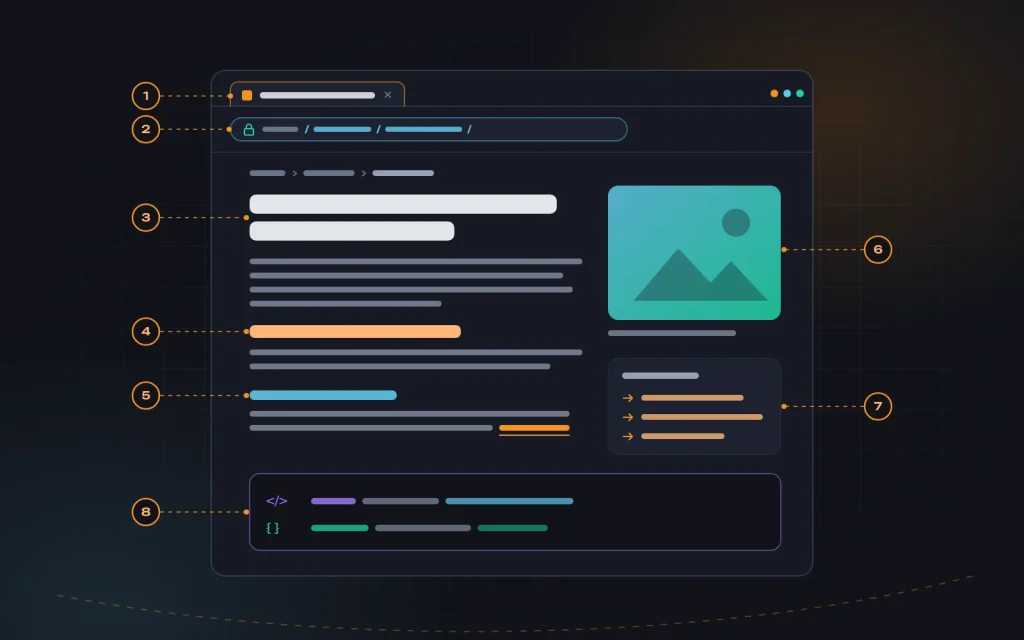
The title tag is the page’s main text signal. We put the primary query near the beginning, add a qualifier that sets the page apart from competitors (price, location, a key benefit), and place the brand name at the end. Every title on the site should be unique. When there are hundreds of pages, we write a template — and craft titles by hand for the most important ones.
The meta description doesn’t affect rankings directly, but it does affect whether people click your snippet. Think of it as an ad in the search results: what the person gets, why you’re better, and what the next step is. A well-written one gets shown more often than a passage pulled from the page.
H1 — one per page. It answers the query and matches the title in meaning, though not necessarily word for word. H2 and H3 build the logical structure of the text: sections and subsections. We often see heading tags used purely for styling — a footer “Subscribe” block as an H2, or slider items as H1s — which makes the page structure incoherent.
| Element | Guideline | Common mistake |
|---|---|---|
| title | 50–65 characters, query near the start | The same template with no product or service name |
| meta description | 120–160 characters, benefit plus call to action | Empty, or copied across every page |
| H1 | One per page, answers the query | The logo wrapped in an H1, or several H1s in the template |
| H2–H3 | Logical sections of the text | Heading tags used to style blocks |
| image alt | A short description of what the image shows | A comma-separated list of keywords |
One more thing we check right away: headings and the main copy should be in the HTML the server returns, not loaded by a script after a click or scroll. Search engines process JavaScript with a delay and not always completely, so content that appears only after interaction may never be seen.
How do you know which pages to fix first? We open the Performance report in Search Console and look for pages with lots of impressions but a low click-through rate, as well as pages sitting in positions 5–15. For these, a new title and description often bring a noticeable lift in clicks without any other changes.
Site structure and URLs
Structure is the map that tells both people and crawlers what matters most on the site. We build it from search demand: every group of queries for which the search engine shows distinct pages gets its own page on the site. How to collect and group those queries is covered in “Building a keyword map”.
Our core rules for structure:
- No more than three clicks from the homepage to any important page. The deeper a page sits, the less often it gets crawled and the less authority it receives.
- One page, one topic. Two pages targeting the same query compete with each other, and usually neither reaches the top.
- Logical nesting: section → category → subcategory or service page. Breadcrumbs on every page show that path.
- No orphan pages — pages that no internal link points to.
We keep URLs short, readable, and stable: lowercase, hyphen-separated, no parameters or system IDs. For example, /services/roof-repair/ instead of /index.php?cat=12&id=487. We pick one format — with or without a trailing slash, with or without www, HTTPS only — and 301-redirect every other variant to it.
The most important URL rule: change them only when you genuinely have to, and always with redirects. We regularly see sites lose most of their organic traffic after a redesign or a move to a new CMS, simply because the old URLs started returning 404s.
So before any structural change, we build a mapping table: every old URL paired with its new URL. Pages with backlinks and traffic go to the closest matching page, never en masse to the homepage. After launch, we crawl the site to catch internal links pointing to redirects or dead pages.
Internal linking
Internal links do three jobs: they help crawlers find pages, distribute authority between them, and — through the link text — signal what each page is about. It’s a tool you control completely, and it costs nothing.
How we build internal linking:
- Main menu and footer — for key sections. The main menu shouldn’t have a hundred items: we put the essentials there and show deeper levels inside each section.
- Breadcrumbs — the path from the page back to the homepage, useful for both people and crawlers.
- In-text links — the most valuable kind. A blog post links to a service page where it makes sense for the reader, and the service page links to an article answering common questions.
- “Similar” and “related” blocks — for catalogs and blogs, so pages at the same level are connected to each other.
Anchor text should explain where the link goes. “Read more” or “click here” tells neither people nor search engines anything. “Roof repair pricing” does. Still, avoid dozens of identical exact-match anchors: natural variety reads better.
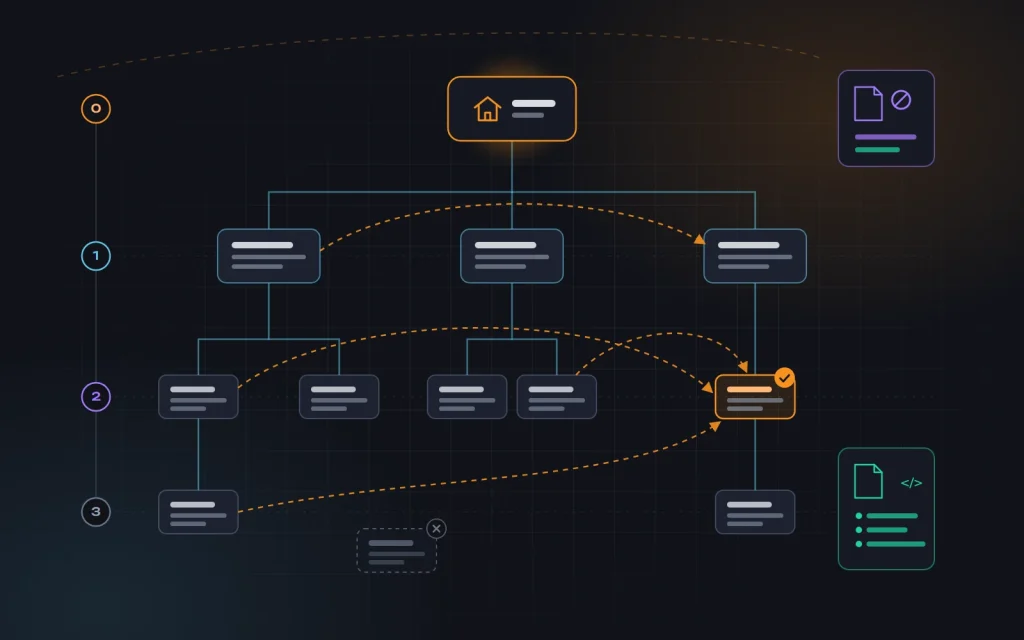
We also check where the authority actually flows. The pages that make you money should get the most internal links. Often it’s the opposite: footer pages like the privacy policy get the most links, while the main service gets one link from the menu. Crawling the site with Screaming Frog, Sitebulb, or a similar tool reveals that imbalance within an hour.
robots.txt, sitemap.xml, and index control
These two files tell crawlers where not to go and which pages you consider important. They’re simple, but a mistake in either one can wipe out all your other work.
robots.txt sits in the site’s root directory and restricts crawling. We use it to block the cart, user accounts, internal search, and system parameters for sorting and sessions. And we never block CSS, JavaScript, or images: without them, the crawler sees a broken page and may evaluate it less favorably. The most dangerous mistake we see after new sites launch is a Disallow: / line left over from the staging server.
Note the difference: robots.txt prevents crawling, but it doesn’t guarantee a page stays out of the index. If a page needs to be removed from search, it needs a noindex directive in the robots meta tag or the HTTP response header — and the page itself must remain crawlable, otherwise the crawler will never see that noindex.
sitemap.xml is the list of pages you want to appear in search. Our rules for the sitemap:
- Only pages that return a 200 status code, are open for indexing, and are canonical.
- No redirects, no 404s, no utility filters, no noindexed pages.
- Automatic updates whenever pages are added or removed.
- A reference to the sitemap in robots.txt, and submission in Google Search Console.
After that, we review the indexing report in Search Console once a month. A sudden jump in “Crawled — currently not indexed” pages, or thousands of unexpected new URLs, almost always signals a technical problem that’s better caught before it hits your rankings. The same report shows which URL Google has chosen as canonical for a given page — if it doesn’t match yours, that’s a sign to go looking for duplicates. The URL Inspection tool shows how the crawler sees any single page.
Duplicates, canonicals, and redirects
A duplicate is the same or nearly the same content available at different URLs. It shows up more often than you’d think: through sorting parameters and UTM tags, print versions, multiple paths to the same product, pagination pages, and www and non-www copies. The search engine then picks which version to show — not always the one you would choose.
We handle duplicates with three tools:
| Situation | Solution |
|---|---|
| The page has moved permanently, or the URL format has changed | 301 redirect to the new URL |
| Several versions of the page need to exist (parameters, sorting, UTM) | rel=”canonical” pointing to the main version |
| A utility page is useful to people but not needed in search | noindex, follow |
| The page is gone and there’s no replacement | A 404 or 410 status code |
We put a <link rel="canonical"> tag on every page, including self-referencing ones — this protects against duplicates created by parameters. The canonical URL must be absolute, open for indexing, and return a 200 status code. The most expensive mistake we’ve ever seen was a canonical in a template that pointed every page to the homepage: within a few weeks, the site had effectively disappeared from search.
With redirects, the main rule is no chains. If URL A points to B and B points to C, we rewrite the redirect so A goes straight to C, and we update internal links to the final URL. For multilingual sites we add hreflang: each language version has its own URL and references the others — otherwise they may be treated as duplicates.
Online stores are especially prone to duplicates because of filters, sorting, and product variants. There we split filters into those with real search demand that deserve their own page, and utility filters that we keep out of the index. We walked through this approach in detail in “Five tips for ecommerce SEO”.
Structured data and images
Structured data (Schema.org in JSON-LD format) tells the search engine exactly what’s on the page: an organization, a product, an article, a review, breadcrumbs, questions and answers. Markup isn’t a direct ranking factor, but it enables rich results — price, rating, availability — which stand out more in search and tend to get more clicks.
The minimum set we implement on most sites:
- Organization or LocalBusiness — name, logo, contact details, address.
- BreadcrumbList — for every page with breadcrumbs.
- Product with Offer — for product pages: price, currency, availability.
- Article — for blog posts.
The key rule: markup must match what a person actually sees on the page. A rating with no real reviews, or a price that doesn’t appear in the content, violates the guidelines — and can cost you rich results across the entire site. We verify everything with the Rich Results Test and the Enhancements reports in Search Console.
Images affect both page speed and image search. Here’s what we do with them:
- Descriptive file names:
red-clay-roof-tile.webp, notIMG_4587.jpg. - An alt attribute with a short description of what the image shows — not a list of keywords.
- Modern formats like WebP or AVIF, compressed with no visible loss in quality.
- Responsive sizes via srcset, so a phone doesn’t download an image meant for a wide monitor.
- Explicit width and height, so the layout doesn’t shift while loading.
- Lazy loading for everything except the main above-the-fold image.
Speed in general is a big topic of its own, and we handle it as part of our website speed optimization service. For how to evaluate your mobile version, see “Succeeding with mobile-first indexing”.
What this looks like in practice
A typical situation: a construction services company with a site of around two hundred pages, several months of paid links — and no noticeable movement. During the audit we find that the site is reachable at four different URL variants, every service page has the title “Services — Company Name,” the core services sit four levels deep and get a single internal link from the menu, and the sitemap contains several dozen URLs that redirect.
We set up a single canonical URL version, rewrite titles and descriptions for the key pages, rebuild the menu so services are one click from the homepage, add internal links from the blog, clean up the sitemap, and implement structured data. Indexing changes first, then impressions and clicks grow for the target queries. Only at that point do the links start working the way they were expected to. The actual numbers depend on the niche and competition, so we won’t promise them in advance.
Six mistakes we see most often
- The staging site is indexed, or the live one is blocked. After launch, a copy on the test domain ends up in search, while the main site still carries a crawl block.
- Restructuring without a redirect map. Old URLs return 404s, and authority built up over years vanishes.
- Identical meta tags on dozens of pages. The search engine can’t tell which page to show for a query.
- Internal linking through the menu only. Important pages get as many links as secondary ones.
- Markup that doesn’t match the page. Star ratings without reviews or made-up prices are a direct route to penalties.
- Heavy images without dimensions. Slow loading and a jumpy layout on phones.
A quick checklist
- The site is reachable at only one URL version: HTTPS, one choice of www and trailing slash.
- Every page has a unique title, meta description, and a single H1.
- Important pages are no more than three clicks from the homepage; there are no orphan pages.
- robots.txt doesn’t block needed sections, CSS, or JavaScript.
- sitemap.xml contains only canonical pages returning a 200 status.
- Every page has a correct canonical, and there are no redirect chains.
- Basic structured data is in place and validates without errors.
- Images are compressed and have alt text, dimensions, and lazy loading.
- Search Console is connected, and the indexing report is reviewed monthly.
Frequently asked questions
How long does on-page optimization take?
An audit of a small site takes a few days; implementation takes anywhere from a few weeks to a few months, depending on the CMS and the scope. The first changes in indexing usually show up 2–6 weeks after the fixes. And every new section or redesign means checking the foundation again.
Can I do this myself?
Partly, yes. Unique titles, image alt text, basic internal linking, and connecting Search Console are all things an owner can handle alone. Redirects during a restructure, canonicals, and robots.txt, however, are better left to someone who understands the consequences. More on this in “DIY SEO: what you can do yourself”.
Do I need keywords in the meta keywords tag?
No. Google ignores it. What matters far more is that the query appears in the title and H1 and reads naturally in the copy.
What should I do first if time is short?
Make sure the site can be indexed: robots.txt, noindex directives, a single URL version, and the sitemap. Then work on titles and H1s for the 10–20 pages that bring in — or should bring in — the most leads. Those two steps deliver the biggest impact for the least effort.
The bottom line
On-page optimization is the foundation: clear tags, a logical structure, well-planned internal linking, clean robots.txt and sitemap.xml files, controlled duplicates, structured data, and lightweight images. Without it, external links just amplify the chaos. With it, every new link and every new piece of content works at full strength.
If you’d like us to review your site and put together a list of specific fixes, get in touch. We handle on-page optimization both as a standalone project and as part of our full-scale SEO services, and for new projects we build it in from the development stage.
Need advice?
Tell us about the task — we will advise what to do, even if you end up working with someone else.