
Blog
How to write a website specification
“We need a modern website, like our competitors have, only better.” Many of our first client conversations start this way. The owner knows the business inside out but has no reason to know what a website is made of. The trouble is that everyone on the project pictures that “modern website” differently: the designer sees […]
- 15 October 2026
- 16 min read

Articles
How to write a website specification
“We need a modern website, like our competitors have, only better.” Many of our first client conversations start this way. The owner knows the business inside out but has no reason to know what a website is made of. The trouble is that everyone on the project pictures that “modern website” differently: the designer sees animations, the developer sees a catalog with filters, and the owner just wants an enquiry form and a phone number in the header. Two months later all three are disappointed, though each honestly did their part.
A website specification (also called a technical brief or requirements document) turns expectations into requirements you can check. It does not have to be thick or full of jargon. It has to answer three questions: what exactly we are building, why, and how we will know it is done. Below is the structure we use on our own projects, examples of good and bad wording, and the mistakes that most often cost clients time and money.
Why write a spec if you can just agree verbally
Verbal agreements work while the project is small. Once there are a dozen pages, a CRM integration, two languages and several people on the client side, memory stops being reliable. A spec is not bureaucracy; it does four practical jobs:
- Accurate estimates. Without a list of pages and features, any price is a guess. The contractor either adds a buffer “for the unknown” or quotes low and sends extra invoices later.
- A shared vocabulary. To one person “catalog” means a list with photos; to another it means filters, comparison and a wishlist. In the spec we write down exactly what is meant.
- Scope control. New ideas always appear. A spec lets you fairly separate “this was part of the agreement” from “this is a new task, let’s estimate it separately”.
- Sign-off. If the document has acceptance criteria, there is no argument at the end about whether “the site is ready”. We simply go through the requirements one by one.
One more risk people rarely consider: changing contractors. With a decent spec, handing the project to a new team takes days. Without one, the new team first has to work out what was supposed to be built at all.
Brief vs specification: the difference and who writes what
Clients often mix up these two documents. A brief is a questionnaire about the business and its wishes; that is where everything starts. A specification is the processed result of the brief: concrete requirements the team can build against and accept work against.
| Brief | Specification | |
|---|---|---|
| Who fills it in | The client, sometimes with an account manager | An analyst or project manager together with the client |
| Language | Business language: goals, customers, competitors | Requirements language: pages, features, rules, criteria |
| Length | 1–3 pages | From 5 to 30+ pages depending on the project |
| Purpose | Understand the task and get a rough budget | Estimate, build and accept the work precisely |
Can a client write the spec themselves? For a small brochure site, yes. But we recommend splitting roles: you own the business part (goals, audience, processes, content), and the contractor writes the technical part and agrees it with you. An owner does not need to know what caching or hreflang is, but only the owner knows how enquiries are really handled.
If you plan to compare quotes from several studios, prepare at least a detailed brief and a list of must-have features. Otherwise you will get proposals for different websites, and the prices will not be comparable.
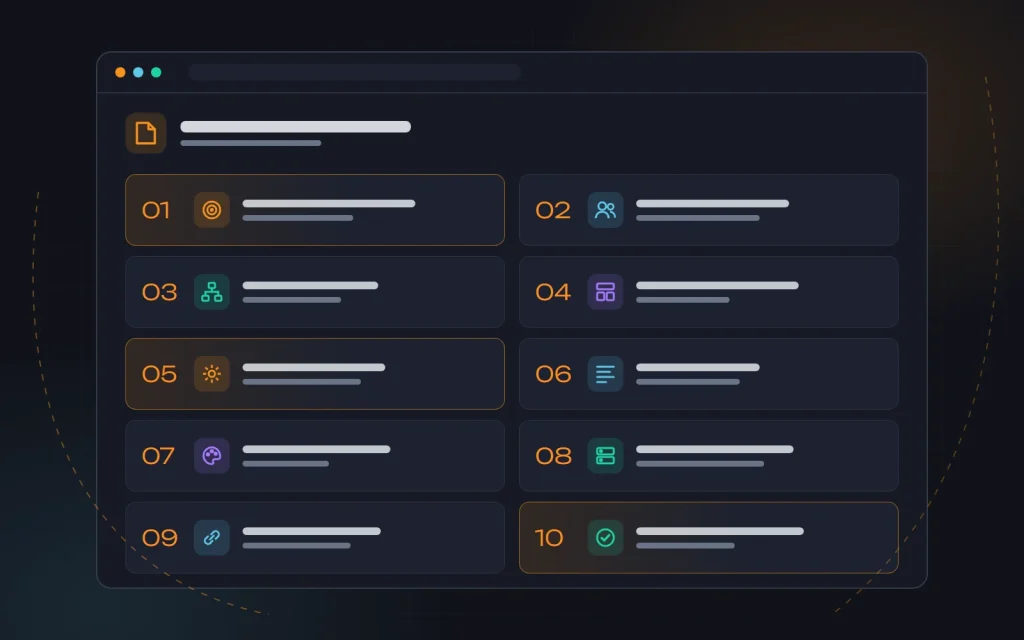
Spec structure: ten sections we always fill in
Length depends on the project, but our set of sections barely changes. For a landing page some take a couple of lines; for an online store, several pages each.
1. General information and goals
The company in a few sentences: what we sell, to whom and where. Most importantly, the business goals of the site, phrased as visitor actions: “request a quote”, “place an order”, “book a consultation”. This is also where we record how results will be measured, meaning which actions count as conversions.
2. Audience and scenarios
Who comes to the site and with what task. For each group, a short scenario: where the person came from, what they want to find out, what holds them back, and what action we expect from them. Two or three scenarios are usually enough. For a dental clinic: “A person in acute pain opens the site on a phone and wants the address, hours and a call button within half a minute.” That tells you what belongs on the first mobile screen.
3. Site structure
A list of all pages and templates with their hierarchy: home page, sections, services, catalog, product pages, blog, contacts, and utility pages (privacy policy, 404, the thank-you page after an enquiry). For each page, its purpose in one sentence.
4. Pages and blocks
What exactly sits on each template: the first screen, benefits, prices, reviews, a form, FAQ. The order of blocks and their content. This section works best alongside wireframes.
5. Functionality
Forms and what happens after they are submitted, search, filters, cart, customer account, calculators, multiple languages. We describe each feature by its behavior, not by its name (more on that below).
6. Content
Who prepares the copy, photos, video and translations, in what format and by what date. How many products or articles the studio uploads and how many the client does.
7. Design
Existing brand guidelines, logo, colors, fonts. Websites you like, with an explanation of what exactly you like about them. How many concepts and rounds of revisions are included. “Make it look nice” does not help a designer. Far more useful is: “We like the amount of white space and the large project photos on this site, but not the dark colors.”
8. Technical requirements
CMS, hosting, supported browsers and devices, requirements for speed, security, backups and admin access.
9. SEO requirements and integrations
Migrating old URLs, redirects, meta tags, structured data, analytics. Connections to external systems: CRM, payments, shipping, inventory, email marketing, messaging apps.
10. Stages, deadlines and acceptance
Project stages, what is delivered at each one, who approves it and within how many days, how the finished site is accepted, and what happens to change requests after launch.
From structure to wireframes
The most expensive rework is not in the code but in the structure. If mid-build it turns out services should be grouped by client industry rather than by type, the menu, templates, internal linking and half the copy all get redone. So we agree the structure before design, and the design after wireframes.
Build the structure not from your own view of the business, but from how people actually search for what you offer. If the site is supposed to bring in customers from search, the spec should contain a page map tied to groups of search queries. We explained how to collect and cluster queries yourself in “Building a keyword map”. One query group, one landing page; if there is no page for a group, search engines have nothing to show.
A wireframe is a black-and-white sketch of a page: the blocks, their order and roughly what goes in them, without colors or images. Wireframes make it easy to agree on the essentials. Do we need a calculator on the first screen? Where does the form go? How many products per row on a phone? Changing a wireframe takes minutes; changing a finished design takes days.
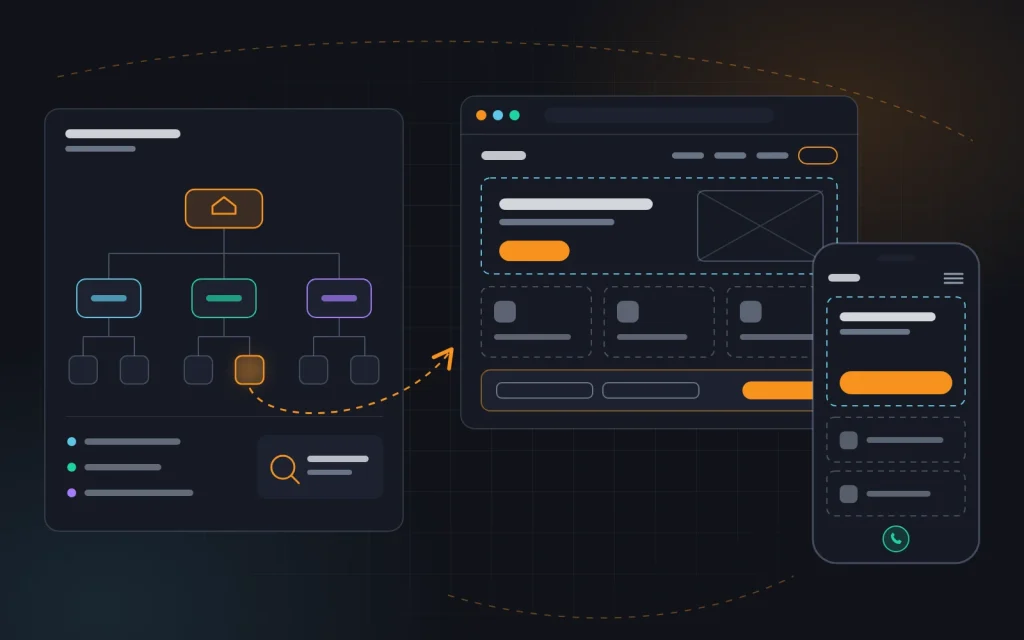
We also wireframe desktop and mobile together. Most visitors arrive on a phone, and search engines judge a site mainly by its mobile version, so the spec needs separate mobile layouts for the main templates, not one line saying “the site must be responsive”. More on this in “Succeeding with mobile-first indexing”.
How to word requirements: vague vs specific
The main rule: every requirement must be testable. If two people could give different answers to “is this done or not?”, the requirement is badly worded. Words like “convenient”, “modern”, “fast”, “stylish” and “simple” mean nothing on their own. They need to be spelled out through concrete actions, numbers or examples.
| Vague | Specific |
|---|---|
| The site should load fast | On mobile, LCP for the main templates is under 2.5 s according to PageSpeed Insights |
| A user-friendly enquiry form | Fields: name, phone, comment (optional). After submission: a thank-you page, an email to the sales manager and a record in the CRM |
| A catalog with filters | Filters by brand, price, size and availability; multiple values at once; a product count next to each value |
| The admin panel should be simple | A manager, without a developer, can add a product, change a price, swap the home page banner and publish a blog post |
| The site should be SEO-optimized | Unique title, description and H1 for every page; redirects from old URLs per the mapping table; XML sitemap; BreadcrumbList markup |
| Like our competitor’s site | A link to the page plus a list of what to take from it: the pricing block structure and the calculator, but not the animations |
We describe functionality through scenarios: who does what, and what the result is. For example, instead of “online booking” we write: “The customer picks a service, a specialist and a free time slot; only open slots are shown; after confirming, they receive an email and a text message; the administrator sees the booking in the calendar and can move it.” That tells the developer an availability calendar, notifications and admin permissions are needed, so the work can be estimated honestly.
Also spell out non-standard situations: a product is out of stock, a payment fails, a phone number is entered without a country code, a form is submitted twice. These edge cases are the most often forgotten, and later they eat a week of rework.
The technical part: what to pin down even if you are not technical
The studio usually writes this section, but several decisions must be agreed with you, because you will live with them for years.
- CMS and code ownership. What the site is built on and whether you can hand it over to another contractor. We recommend widely used platforms and full access for the client: hosting, domain, admin panel, analytics.
- Hosting and domain. Whose name they are in. A domain registered to the contractor is one of the nastiest problems people bring us.
- Speed. Target Core Web Vitals for the main templates and the conditions under which they are tested. How we approach this is described on our website speed optimization page.
- Security and backups. SSL, regular backups with a defined retention period, CMS and plugin updates, spam protection for forms.
- SEO at launch. If the site already exists and ranks, the spec must include a table mapping old URLs to new ones with 301 redirects. We covered the basic requirements for tags and structure in “On-page SEO basics”.
- Analytics. Which events are tracked: form submissions, clicks on the phone number and on WhatsApp, Viber or Telegram buttons, purchases. Without this, you will not know after launch whether the site is working.
For an online store the technical part is much bigger: product imports, stock sync, payment and shipping, order statuses, manager roles. We start such projects with a separate discovery stage as part of ecommerce development, because a mistake in inventory or order logic costs more than any design mistake.
Stages and acceptance: how not to get stuck in revisions
What costs the most nerves is not development but approvals: the design waits a week because the director is away, feedback from three people contradicts itself, and every day brings one more “small request”. All of this can be planned for in the spec.
We split the project into stages, and for each one we record three things: what we deliver, how many days the client has to respond, and how many rounds of revisions are included. A typical sequence looks like this:
- Structure and wireframes: we agree the page list and the layouts of the main templates.
- Design: the home page and key inner pages first, then the remaining templates.
- Front-end and back-end development: a working version on a staging domain.
- Content: copy, photos, products, translations.
- Testing and launch: checking against the criteria, moving to the live domain, redirects, analytics.
On the client side we ask for a single point of contact who gathers feedback from colleagues and sends it as one list, so the team does not have to guess which comments are final.
We word acceptance criteria as specifically as requirements. For example: every page in the structure opens without errors; forms send enquiries to the specified email address and to the CRM; the site displays correctly in current versions of Chrome, Safari, Firefox and Edge on phone and desktop; speed metrics meet the targets; analytics events are set up. If every item is met, the stage is accepted, and new ideas move to the next iteration.
Common spec mistakes
What we see most often in documents clients bring us, and what later turns into disputes:
- A spec copied from the internet. A “for any website” template is full of items you do not need and misses what matters to you.
- Describing solutions instead of problems. “We need a slider on the home page” instead of “we need to show our three main services on the first screen”. A problem can be solved better than planned; a prescribed solution can only be executed.
- Subjective words without explanation. “Beautiful”, “convenient”, “fast”: everyone reads them differently, and none of them can be tested.
- Forgotten content. The design is approved, the pages are built, but there is no copy and no photos. Launch slips by months. For how to prepare copy in advance, see “Writing content for your website”.
- No process after the enquiry. The form exists, but nobody has described where the enquiry goes, who sees it and how quickly they respond.
- Ignoring the old site. The new site launches with different URLs and no redirects, and organic traffic built up over years disappears.
- No acceptance criteria. At the end of the project an endless “just a few more tweaks” loop begins.
- A spec nobody updates. Decisions change, the document does not, and six months later nobody knows what is still valid.
What this looks like in practice
A typical situation: a company that installs windows and doors wants a new website. The first brief is half a page: “modern design, catalog, calculator, reviews, top of Google”. In the meeting it turns out no catalog is needed, since customers do not buy windows online. What is needed is a page for each product type and each city served, because that is how people search. And the “calculator” really means a form with dimensions, after which a manager calls back with an exact price; an automatic calculation would give inaccurate numbers.
The result is a twelve-page spec covering eighteen page templates, a quote form that feeds the CRM, a scenario for weekend enquiries, migration of reviews from the old site, a redirect table and a list of analytics events. The estimate becomes accurate and the designer gets it right first time. Extra wishes that came up later were estimated separately and moved to a second phase without delaying launch.
A short checklist before you send the spec
- The site’s goals are phrased as visitor actions, and it is clear what counts as a conversion.
- There is a list of all pages and templates, including utility pages.
- The main templates have wireframes for desktop and mobile.
- Every feature is described as a scenario, including non-standard situations.
- There are no subjective words left unexplained.
- It is clear who prepares the content, when, and in what format.
- The domain, hosting and access are registered in your name.
- For an existing site, there is a redirect table.
- Integrations and analytics are described.
- There are stages, approval deadlines and acceptance criteria.
Frequently asked questions
How long does it take to prepare a spec?
For a brochure site, a few days including one or two meetings. For a corporate site or online store, one to several weeks. It pays off: rework during development takes far longer.
Do you charge for writing the spec?
On complex projects discovery and the spec are a separate stage. That is fair to both sides: you get a document you can take to any contractor, and we get a precise picture for the estimate.
Can the spec change during the project?
It can, and should, when new information appears. Just record each change: what changed, its effect on timeline and budget, and who approved it.
What if I have no idea what I need?
Start with a brief: describe the business, your customers, your competitors and what should happen after someone lands on the site. We will work out the rest in a meeting and propose a solution. Knowing “how it should be done” is our job, not yours.
Summary
A good website specification is neither a formality nor a hundred pages of jargon. It is a shared agreement about what we are building, why and how, written so that every item can be checked. Goals, scenarios, structure, wireframes, functionality, content, technical requirements and acceptance criteria: with these in place, the project stops being a lottery.
If you are planning a new website or a redesign and want to start with a clear spec, get in touch. We will help you put together a brief, prepare the specification and build in everything needed for SEO and promotion later on.
Next
Read more

How much does a website cost
“How much does a website cost?” is the question we hear most often, and we always answer with another: what kind of website? A simple brochure site that goes live in a few weeks and an online store with inventory sync, payments and customer accounts differ not by percentages but by multiples. Owners also often […]
On-page SEO basics
Tags, internal linking, robots.txt and structure: the base without which external links do nothing.
Need advice?
Tell us about the task — we will advise what to do, even if you end up working with someone else.