
Blog
Site migration without losing rankings
“We moved to a new website and our leads from Google disappeared.” A noticeable share of our audits start with that sentence. The story is familiar: a company changes its domain or moves from an old custom system to WordPress, OpenCart or Shopify, the new site goes live on a Friday evening, and two weeks […]
- 27 October 2026
- 16 min read

Articles
Site migration without losing rankings
“We moved to a new website and our leads from Google disappeared.” A noticeable share of our audits start with that sentence. The story is familiar: a company changes its domain or moves from an old custom system to WordPress, OpenCart or Shopify, the new site goes live on a Friday evening, and two weeks later organic traffic is down by half. The design is not to blame. The search engine simply could not work out where the pages it had shown people for years had gone.
A migration is one of the few situations in SEO where you can lose in a day what took years to build. It is also very manageable: follow a checklist and rankings usually return quickly, often helped by a cleaner structure. Below is the sequence we use in our migration projects, from inventory to monitoring months after launch.
Types of migration and what makes them risky
In SEO, “migration” means any change after which a search engine has to understand your site all over again. The risk depends on how much changes at once. These are the scenarios we see most often:
| Type of move | What changes | Risk level |
|---|---|---|
| Switching to HTTPS | The protocol; page addresses stay the same | Low |
| New domain, same site | The domain; structure and content unchanged | Medium |
| New CMS, same domain | Templates, often URLs, meta tags, internal linking | Medium to high |
| New domain + new CMS + new structure | Almost everything | High |
The main rule we explain to every client: the fewer changes at once, the easier it is to find the cause if something goes wrong. When possible, we split the stages over time: first we move the site to the new CMS while keeping its URLs, and change the domain later, once everything has settled. When it all has to happen at once, for example because of a rebrand, preparation needs to be especially thorough.
Also ask honestly whether you need to move at all. A new CMS brings no SEO advantage by itself. If the old platform handles meta tags and URLs, is fast and gets updates, improving it is often cheaper. Moving makes sense when the system blocks growth, no longer gets security updates, or the business is renaming.
Stage 1. Inventory: record everything you have now
The biggest mistake is starting with the new site. We always start with the old one: while it is live, it shows which pages exist, which bring traffic and which ones other sites link to. After launch this is much harder to recover.
Here is what we collect before development begins:
- A complete list of URLs. We crawl the site with a crawler such as Screaming Frog or Sitebulb, then add addresses from the sitemap, from the Pages report in Google Search Console and from analytics for the last 12 to 16 months. Each source finds what the others miss: old promo pages, PDF files, URLs with parameters.
- Pages that bring traffic. We export clicks and impressions by page from Search Console, and landing sessions and conversions from analytics. This shows us which 10 to 20 percent of URLs bring most of the visitors and leads.
- Backlinks. We export the Links report from Search Console and, where possible, data from Ahrefs or a similar tool. Pages that other sites link to must get a precise redirect; that is how you make sure their authority is not lost.
- On-page SEO elements. Title, description, H1, canonical, meta robots, hreflang, Schema.org markup, image alt text. We save the crawl export as a “snapshot” of the old site.
- Baseline metrics. We record rankings for key queries, the number of indexed pages and the speed of the main templates. Without this starting point, it is impossible to say what exactly changed after launch.
We also review robots.txt, subdomains, language versions and everything connected to the site: analytics, pixels, CRM, forms, live chat. Old sites often hide something nobody remembers that still brings in leads, like a landing page from a long-finished campaign.
Stage 2. The redirect map is the heart of the migration
A redirect map is a table that lists the new address for every old one. It determines whether the search engine passes the old pages’ authority to the new ones. We build it as a spreadsheet with three columns: old URL, new URL and a note (moved as is, merged, removed).
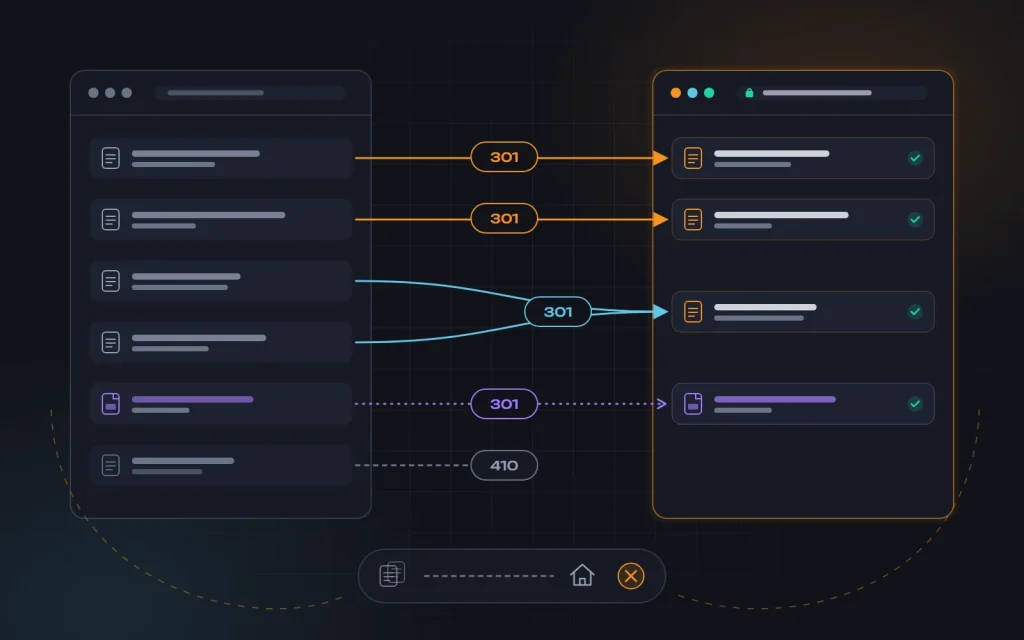
The rules we follow:
- 301 only. A permanent redirect signals that the page has moved for good. Temporary 302s, JavaScript redirects and meta refresh are not suitable for a migration.
- One to one. Every old page points to its closest match in meaning. Category to category, article to article, product to the same product.
- No mass redirects to the homepage. Search engines treat them as “soft 404s”, and no authority is passed on. If there really is no equivalent, it is better to return a 404 or 410, and to create a replacement for important pages.
- No chains. If the site has moved before, the old redirects need to be rewritten so they go straight to the final address instead of hopping through two or three intermediate ones.
- Every URL variant. With and without www, http and https, with and without a trailing slash, with capital letters. Each variant should reach the canonical new address in a single step.
- Not just pages. Images, PDF catalogs and price lists that people have bookmarked or that forums link to are part of the map too.
On large sites we do not write thousands of rows by hand. Products and articles follow rules: if the old address is /product.php?id=125 and the new one is built from the product name, we match them by product ID in the database. Categories and key pages we check row by row, since mistakes there cost the most.
One more tip: if you can keep the old URLs unchanged when moving to a new CMS, keep them. The best redirect is the one you never needed. Change URLs only when the old ones are genuinely bad, such as parameter-heavy or meaningless IDs. We describe how we build a clear URL structure in On-page SEO basics.
Stage 3. What must be carried over to the new site
Even with perfect redirects, a site will drop if the new version is weaker than the old one in content. The search engine compares: before, the page had 800 words of useful text, a specifications table and reviews; now it has a banner and two sentences. That is why we check the new site against the snapshot of the old one for every important template.
Our list of what has to move over without losses:
- Content of pages with traffic: text, tables, FAQs, reviews. You can improve it, but do not cut it without a reason.
- Title, description and H1. If they worked, we move them as they are. New meta tag templates get tested after things settle, not on launch day.
- Internal linking. Menus, breadcrumbs, “related products” blocks and in-text links should point straight to the new URLs, not to the old ones through a redirect.
- Canonical and meta robots. We check that canonical tags point to the new URLs and that no
noindexleft over from development remains on live pages. - Language versions and hreflang if the site is multilingual. Each version must reference the new URLs of its counterparts. We covered working with language versions in SEO in English-speaking markets.
- Structured data: Organization, Product, BreadcrumbList, Article. A new theme or plugin often generates markup differently or not at all.
- Images with alt text and meaningful file names. For many online stores, image search brings noticeable traffic.
- Analytics and integrations: GA4, Search Console, pixels, conversion events, sending leads to the CRM, verification codes.
We also look at speed and the mobile version. The new site must not be slower than the old one: if the main template got heavier, a ranking drop can be wrongly blamed on redirects when the real cause is something else entirely. We speed up templates before launch as part of our website speed optimization service. Since Google evaluates a site primarily by its mobile version, we test it on a real smartphone. There is more on this in Succeeding with mobile-first indexing.
Stage 4. The staging site: test before launch
We always build the new site on a staging server, and the first thing we do is block it from indexing, ideally with server-level password protection. A disallow rule in robots.txt is less reliable: if someone links to the staging site, its URLs can end up in the index without content, and a duplicate of your site appears in search.
On staging we run several checks:
- A crawl of the new site compared with the snapshot of the old one: are all important pages in place, have any duplicates, empty pages, broken links, or pages without a title or H1 appeared?
- A redirect map test. We run the full list of old URLs through the crawler in list mode and check that every address returns a 301 in a single step to the right page, which in turn returns a 200.
- A template review of the homepage, category, product page, article and contacts page, on desktop and on a smartphone.
- Forms and payments. A test lead must reach the sales team, and a test order must go through to the end.
- Speed of the main templates, compared with the old site’s figures.
This is where most problems surface: empty pagination pages, indexable filters, broken markup, a forgotten privacy policy page. Finding them before launch is far cheaper than after.
Stage 5. Launch day: the order of steps
We never launch a migration on a Friday or right before holidays. The best time is early in the week, during the lowest season for demand, when the team is available for several days in a row. The order is:
- Take a full backup of the old site and database, so you can roll back within an hour if needed.
- Move the final content: orders, new articles and reviews that appeared during development.
- Remove the password and the indexing block from the new site. This is the step people forget most often.
- Turn on the redirects and immediately spot-check 20 to 30 key URLs by hand.
- Update robots.txt and the XML sitemap, which should list only new URLs that return a 200.
- Verify the site in Search Console (a new property for a new domain) and submit the sitemap.
- Check analytics in real time and send test leads.
- Crawl the whole site again, this time on the live server.
A useful trick: temporarily keep a sitemap of the old URLs on the server so the search engine revisits them faster and sees the redirects. Remove it after a few weeks.
Stage 6. Specifics of moving to a new domain
If the domain changes, a few more steps are added to everything above:
- The Change of Address tool in Search Console. Once the redirects are live, we specify the new domain in the old domain’s property. The tool is designed specifically for domain changes, not for switching to HTTPS or restructuring URLs.
- Do not sell or let the old domain expire. The redirects should run for as long as possible, at least a year, and in practice we recommend keeping the domain permanently: old links, business cards and bookmarks will point to it for years.
- Backlinks. We ask the most valuable sources, such as partner sites, directories and social profiles, to update their links to the new address. A redirect passes authority, but a direct link is more reliable.
- Everywhere your web address appears: your Google Business Profile, ad accounts, email signatures, newsletters, printed materials, WhatsApp, Viber or Telegram business profiles, payment systems.
- Email on the domain. If email addresses change along with the domain, we plan that separately so customer emails do not get lost.
One more detail: before buying a new domain, we check its history. A former spam domain may carry penalties or a poor backlink profile.
After launch: monitoring the first weeks
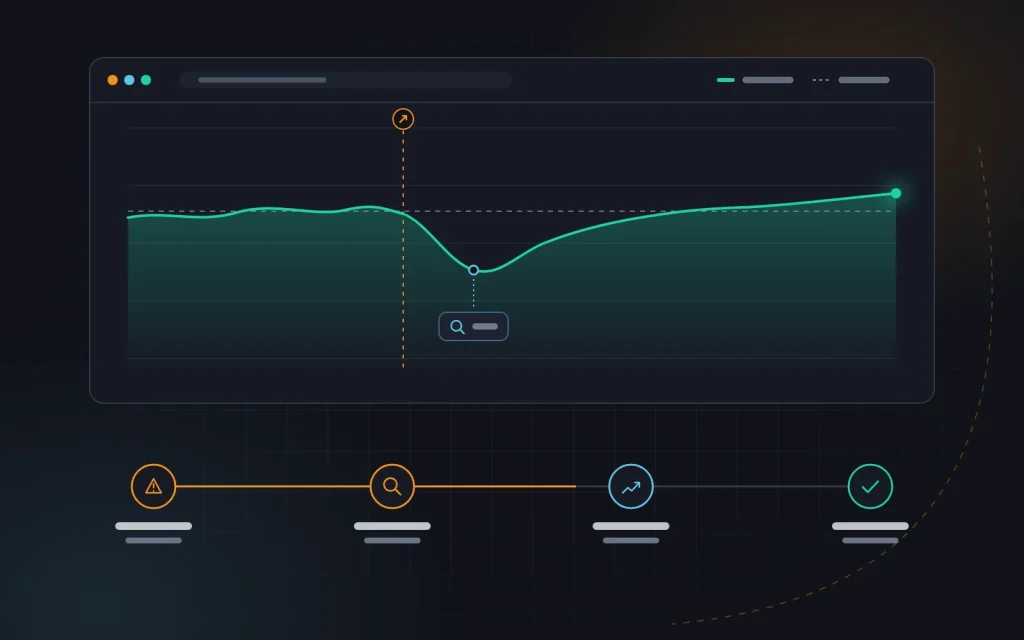
Ranking fluctuations after a migration are normal: the search engine needs time to recrawl and reassign signals. Our job is to spot a real problem before it hits your leads.
| When | What we check |
|---|---|
| First 1 to 3 days | 404 and 5xx errors in the logs, redirects, analytics, forms, robots.txt |
| First 2 weeks | The indexing report in Search Console, crawl stats, traffic to key pages |
| 1 to 2 months | Rankings and clicks against the baseline, how pages move over in the index |
| 3 to 6 months | Stabilization and new opportunities: better meta tags, content, structure |
In the first days the most useful sources are the Pages report in Search Console and the server logs, which show what the crawler requests and gets back. Many 404s on old URLs mean missing redirects. An important page stuck in “Discovered, currently not indexed” means checking internal links and the sitemap.
In our experience, after a careful migration traffic recovers within a few weeks, occasionally a couple of months. If it is still well below baseline after a month, look for a systematic error instead of waiting.
What this looks like in practice
A typical situation: an equipment supplier decides to move from an old custom-built system to WordPress and change its domain at the same time after a rebrand. The old site has a few hundred pages, some of them products with addresses like /catalog/item.php?id=…, plus dozens of PDF manuals that dealers link to. The developer has already started building the new templates, and SEO comes up a month before launch.
The inventory shows that a noticeable share of organic entrances comes from those PDF manuals and a few old articles missing from the new structure, so we carry them over rather than “clean them up”. Products are matched by SKU in the redirect map, categories and articles by hand. On staging we find a forgotten noindex in the category template and product markup without prices. We launch on a Tuesday and in the first week add a few dozen redirects for URLs that only showed up in the logs. Traffic fluctuates for a couple of weeks and returns to its previous level. Timelines depend on the site, so we never promise them, but the sequence is always the same.
Mistakes we fix most often
Most of the “failed” migrations that come to us have one or more causes from this list:
- A forgotten noindex. The indexing block set on the staging site made it onto the live site.
- Redirects to the homepage instead of exact matches, so every page that had rankings lost them at once.
- Temporary 302s instead of permanent 301s, because that is the plugin’s default setting.
- Lost content: category text, FAQs and reviews were not carried over “because the new design has no room for them”.
- Letting the old domain expire a year after the move, taking all the redirects and link authority with it.
- Analytics not migrated, or migrated without conversion events, so nobody can say what happened to leads.
A short migration checklist
- A complete list of old URLs collected from the crawler, Search Console, analytics and the sitemap.
- A snapshot of on-page SEO elements and baseline traffic and ranking metrics saved.
- A one-to-one 301 redirect map with no chains and no mass redirects to the homepage.
- Content, meta tags, structured data and hreflang carried over without losses.
- Staging password-protected, the site crawled, redirects tested.
- On launch day: noindex removed, robots.txt and sitemap updated, Search Console set up.
- For a new domain: Change of Address submitted, old domain renewed.
- Daily monitoring for the first weeks and comparison against the baseline.
Frequently asked questions
Can you migrate without any traffic dip at all?
Short fluctuations happen almost every time, even with perfect preparation. But with correct redirects and preserved content they are small and pass quickly. A serious drop that lasts for months is a sign of an error, not a “normal price of moving”.
How long should redirects stay in place?
As long as possible. Google recommends at least a year, but we see no reason to ever turn them off: they cost almost nothing, and old links and bookmarks live on for years.
Can you change the domain, CMS and design all at once?
You can, but the risk grows and finding the cause of any problem gets harder. If the business allows it, we spread the changes out over time. If not, we compensate with an especially detailed redirect map and thorough testing.
When should you bring in an SEO specialist?
At the very start, before the developer begins building templates. Fixing the structure at the planning stage takes a few hours; winning back lost rankings after launch takes months.
Summary
Moving a site to a new domain or a new CMS is not a lottery. It is a project with clear stages: inventory, redirect map, content transfer, testing, a careful launch and monitoring. Most traffic losses come from haste and skipped steps, not complexity.
If you are planning a migration, get in touch with us before development starts. We will prepare the redirect map, check the new site before launch and support you through the first months as part of our SEO services. And if the move involves a new platform for your online store, we can help with ecommerce development that has SEO built in from day one.
Next
Read more

Redesigning a site without losing rankings
“We launched the new site, and a week later we were getting half the enquiries.” We receive emails like this more often than we would like. The new design looks better, the sales team is happy, and yet the graph in Search Console is slowly sliding down. The owner blames Google’s algorithms, but the cause […]

WooCommerce, OpenCart or Shopify: which to choose
“Which platform should we build our store on?” is one of the first questions we hear from clients. Usually there is a friend’s advice behind it (“we run OpenCart and it works fine”), an ad (“launch on Shopify in an evening”) or habit (“our site is on WordPress, so WooCommerce it is”). Any of these […]
Need advice?
Tell us about the task — we will advise what to do, even if you end up working with someone else.