
Blog
Redesigning a site without losing rankings
“We launched the new site, and a week later we were getting half the enquiries.” We receive emails like this more often than we would like. The new design looks better, the sales team is happy, and yet the graph in Search Console is slowly sliding down. The owner blames Google’s algorithms, but the cause […]
- 22 October 2026
- 16 min read

Articles
Redesigning a site without losing rankings
“We launched the new site, and a week later we were getting half the enquiries.” We receive emails like this more often than we would like. The new design looks better, the sales team is happy, and yet the graph in Search Console is slowly sliding down. The owner blames Google’s algorithms, but the cause is usually far more mundane: pages that brought in clients for years have disappeared, URLs changed without redirects, and the copy was cut back “to keep the design clean.”
The good news is that a redesign does not have to cost you your rankings. We run launches like this regularly, and over the years we have settled on a sequence of steps that keeps the risk to a minimum. Below is the step-by-step plan, from the URL inventory to post-launch monitoring, in the same order we follow ourselves.
Why traffic drops after a redesign
A search engine does not see your design as a picture. It sees URLs, code, text, internal links and load speed. Change any of these and Google re-evaluates the site; if it cannot find what it used to, your rankings go to competitors.
These are the most common causes of a post-launch drop that we see when auditing failed redesigns:
- Changed URLs without 301 redirects. Old pages return 404, and all their accumulated authority and backlinks simply vanish.
- Removed or shortened copy. The designer dropped the “extra” text under products or services, and that text was exactly what answered search queries.
- A new menu structure. Important pages ended up four levels deep and now receive a fraction of the internal links they used to.
- Lost meta tags. The new theme inserts a generic title such as “Home | Company name” instead of carefully written page titles.
- Indexing blocked. The staging copy had a robots.txt disallow or a noindex tag, and it was carried over to the live site.
- A slower site. Heavy video in the hero, animations, a dozen web fonts, and the mobile version now takes longer to load than the old one.
All of these problems are predictable, which means they can be prevented. The key principle we explain to every client is this: a redesign is not only a design project, it is an SEO project too. An SEO specialist should be on the team from day one, not called in after launch when the graph has already fallen.
Step 1. Inventory: record what works right now
Before anyone draws a new layout, you need to know exactly what you stand to lose. We take a “snapshot” of the old site to compare the new one against; without it, there is no way to tell what broke after launch.
Here is where we collect the data:
| Source | What we export | Why |
|---|---|---|
| A crawler (Screaming Frog, Sitebulb or similar) | All URLs, status codes, titles, descriptions, H1s, canonicals | The full list of addresses and current on-page optimisation |
| Google Search Console | Pages and queries with clicks and impressions for 12–16 months | What actually brings traffic from search |
| Google Analytics 4 | Landing pages, conversions, leads | Which pages bring revenue, not just visits |
| Ahrefs, Semrush or the Links report in Search Console | Pages with external backlinks | URLs you cannot afford to lose under any circumstances |
| Sitemap and ad campaigns | URLs from sitemap.xml, campaign landing pages | Pages a crawler may not reach through internal links |
Everything goes into a single spreadsheet with one row per URL. For each address we note search clicks, conversions, the number of backlinks and a decision: keep, merge, move or remove. Pages that deliver most of the traffic and leads are marked separately as critical. They are usually a small share of the site, but they are the pages we watch most closely later on.
We also record rankings for key queries and save copies of important pages: their text, headings and structured data. That way, after launch we can compare “before” and “after” based on facts rather than memory.
An inventory is also a chance to tidy up: duplicate pages, news posts with zero visits, empty tags and forgotten test pages do not need to move. But we decide using data. No traffic, links or conversions means the page can be merged or removed; anything else earns it a place on the new site or a redirect to its closest equivalent.
Step 2. Keep your URLs or build a redirect map
The best redirect is the one you never need. If the old site already has clean URLs, we recommend keeping them unchanged, even when the CMS, the design and the menu structure all change. The menu can be rebuilt any way you like while the page addresses stay exactly the same.
Sometimes, though, URLs have to change: the old structure is chaotic, addresses contain parameters such as ?id=125, or the catalogue logic is being rebuilt. In that case the key document of the whole project is the redirect map: a table of “old URL → new URL” covering every address from the inventory.
The rules we follow when building the map:
- 301 only. A permanent redirect passes the old page’s signals to the new one. A temporary 302 is not the right tool for moving pages.
- Page to page. Every old URL points to the closest new equivalent: service to service, category to category, article to article.
- No mass redirects to the homepage. Google often treats them as soft 404s, and the page’s authority is lost just as if there were no redirect at all.
- No chains. If the site already had redirects, we update them so the oldest URL goes straight to the new one, not through two or three intermediate hops.
- An honest 410 for dead pages. If a page has no traffic, no links and no equivalent on the new site, it can go. But we make that call deliberately, not because someone “forgot to move it.”
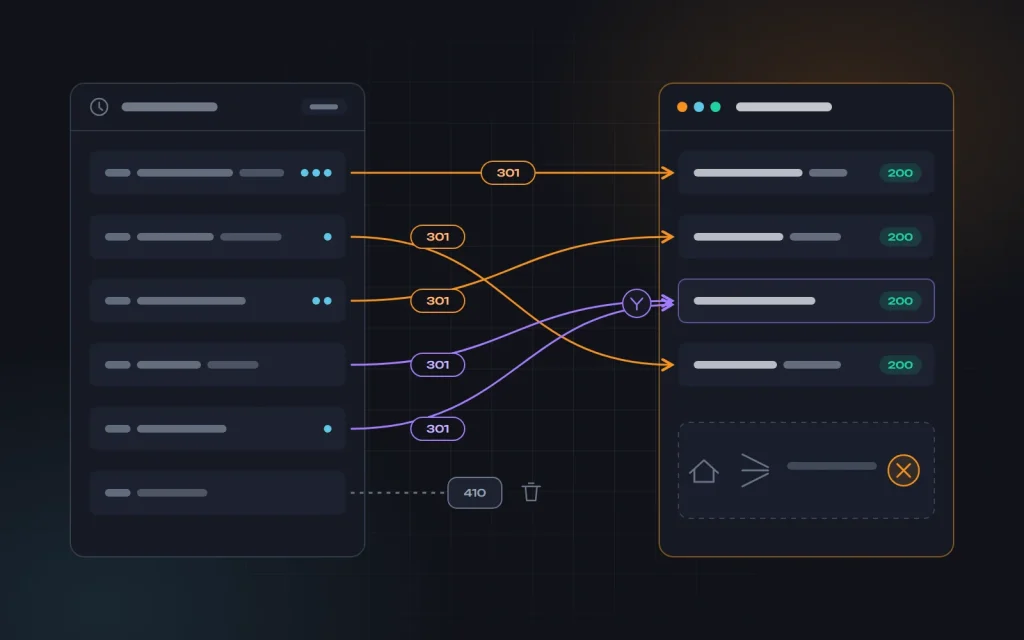
Technically, redirects are best set up at the server level or through a well-tested plugin, not with a JavaScript jump or a meta refresh tag. For large sites with thousands of products we write pattern-based rules, for example so that every address like /catalog/product-125/ leads to /product/product-name/, and then check the most important pages by hand.
The map covers more than pages: images that get image-search traffic, PDFs that partners link to, old URLs with UTM or sorting parameters. We also check trailing-slash, www and http variants; each should reach one correct address in one hop.
One more detail that is often forgotten: redirects need to stay in place for a long time. We keep them for at least a year, and for pages with backlinks, permanently. Removing redirects after a month “because Google has seen everything by now” means losing the links that still point to the old URLs.
Step 3. Move the content and on-page optimisation across
The most dangerous moment in a redesign is when copy is treated as “filler for the layout.” The long service description that brought in traffic does not fit the new short blocks, gets cut by two-thirds, and the page loses the queries it used to answer.
Our rule: the layout adapts to the content, not the other way round. For critical pages the designer works with the real text, not lorem ipsum. Any rewriting happens after launch, as a separate stage, so its effect on rankings is clear.
For every page being moved, we check that:
- The title and meta description have been carried over word for word, not replaced by the new theme’s template.
- The H1 and subheadings are intact and the key phrasing has not been lost.
- The main text has not been shortened or hidden in tabs that only load after a click.
- Images have the same or better alt text, and the files are optimised.
- Structured data such as BreadcrumbList, Product, Organization and FAQ exists in the new template and validates.
- Canonical and hreflang tags point to the correct new URLs if the site is multilingual.
We pay separate attention to internal linking. The old version may have had a “Popular services” block in the footer, links within the copy, and a category sidebar. If the new design removes all of that, important pages receive less internal authority even though their URLs have not changed. We covered this foundation in detail in On-page SEO basics, and working with copy in Writing content for your website.
Step 4. Test on a staging copy before launch
We always build the new site on a staging domain and keep it hidden from search engines. The most reliable option is server-level password protection: that way the copy will never get indexed or create duplicates of the main site. A robots.txt disallow offers fewer guarantees, and it can easily “travel” to the live site along with the other files.
Before launch we run the staging copy through the same crawler we used on the old site and compare the results. Here is our minimum list of checks:
| What we check | How |
|---|---|
| Redirect map | Run every old URL as a list: each should return a 301 to one address that returns 200 |
| Meta tags and H1s | Compare the crawler export with the old snapshot |
| Broken links | Look for internal links to 404s and to redirected URLs |
| Mobile version | Walk through key user journeys on a real smartphone |
| Speed | PageSpeed Insights and Lighthouse on typical page templates |
| Structured data | Google’s Rich Results Test |
| Forms and analytics | Test submissions, GA4 events, conversion goals and pixels |
We give the mobile version special attention: Google judges a site primarily by it, so a beautiful desktop and an awkward smartphone experience is a worse outcome than the old site. More on this in Succeeding with mobile-first indexing. If the new site turns out slower than the old one, we stop and fix that first: compress images, remove unnecessary scripts, set up caching. This is part of our website speed optimisation service.
Step 5. Launch day: the order of operations
We launch on the lowest-traffic day, never on a Friday evening or before a holiday, so the team is on hand if something breaks. Our sequence:
- Take a full backup of the old site, both files and database.
- Move the new site to the main domain and switch on the redirects.
- Remove every indexing block: check robots.txt, the robots meta tag and HTTP headers.
- Manually check the homepage, the critical pages and a few dozen old URLs.
- Generate a fresh sitemap.xml with only live URLs returning 200 and submit it in Search Console.
- Use URL Inspection to request indexing of the homepage and the most important pages.
- Submit a test lead through every form and confirm it arrives and is recorded in analytics.
- Update links in ad campaigns, your Google Business Profile and social media.
If the domain stays the same, you do not need the Change of Address tool in Search Console; it exists only for moving to a different domain. Redirects, a fresh sitemap and careful monitoring are enough.
Step 6. Monitoring in the first weeks after launch
Google recrawls the site gradually, and small ranking fluctuations in this period are normal. Our job is to tell them apart from a real problem and fix the latter in time.
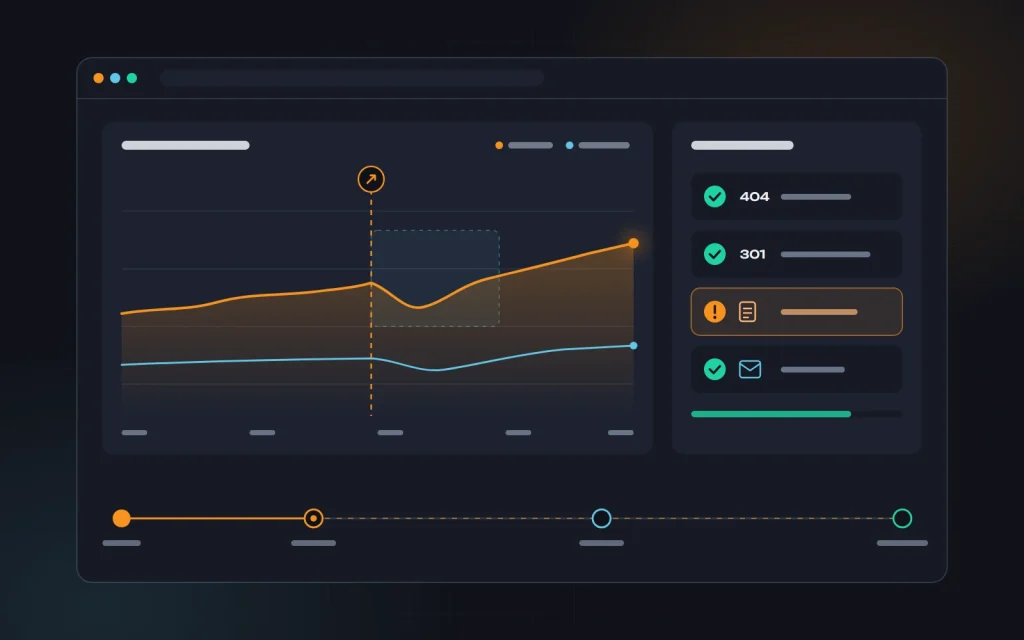
What we track, and how often:
| Period | What we look at |
|---|---|
| First 1–3 days | 404 and 5xx errors in logs and crawls, working forms, indexing blocks |
| First 2 weeks | The Pages report in Search Console, clicks and impressions on critical pages, rankings for key queries |
| First month | Traffic and leads compared with the same period before, speed based on real-user data |
| Months 2–3 | A full repeat audit, checking that old URLs have dropped out of the index in favour of the new ones |
Warning signs we act on immediately: a sharp rise in 404s in Search Console, a traffic drop on a specific critical page while overall traffic is stable, thousands of new URLs suddenly appearing in the index, and falling conversions while traffic stays the same. That last one is almost always a problem with a form, a button or the mobile layout, not with SEO.
If we have server logs, we review them too: they show whether Googlebot is reaching the new pages or getting stuck on old URLs and utility addresses added by the new theme. It is the fastest way to spot a problem before it appears in Search Console, whose reports lag by several days.
If overall traffic dips slightly and recovers within a few weeks, that is ordinary adjustment. If the drop is deep and persistent, we go back to the snapshot of the old site and compare page by page: URLs, copy, headings, links. The cause is almost always found there.
What it looks like in practice
A typical situation: a service business with a site of a few hundred pages and a steady flow of leads from search. An outside agency prepared the new design, and in the mockups the service pages turned into short cards with three paragraphs each. The plan was to “make the URLs prettier” and move the blog over at some later point.
During the inventory we see that most leads come from around twenty service pages and a handful of blog articles that have backlinks. We agree to keep the service URLs, map redirects for the blog, and fit the full copy of critical pages into the new design using expandable blocks and an FAQ. The blog moves together with the main site.
After launch, rankings fluctuate for a few weeks, but clicks on critical pages hold steady. Monitoring turns up a few dozen forgotten URLs from old newsletters, and we redirect them. No dramatic graphs: that is what a successful redesign looks like.
Seven mistakes we see most often
- SEO is brought in after launch. At that point you are treating the damage rather than preventing it.
- No snapshot of the old site. After a drop, there is no way to tell what exactly went missing.
- Every old URL redirects to the homepage. Technically there are redirects, but the pages’ authority is lost.
- Copy cut to fit the layout. Short, pretty blocks replace the description that used to answer search queries.
- The staging noindex goes live. The simplest mistake of all, and it can wipe out traffic within days.
- Redesign and domain change at the same time. The more you change at once, the harder it is to find the cause of a problem. We recommend spacing such steps out.
- Redirects removed after a month. Backlinks to old URLs lead nowhere again.
A short redesign checklist
- A snapshot of the old site is saved: URLs, meta tags, traffic, conversions, backlinks.
- Critical pages are identified and tracked separately.
- URLs are kept, or a complete 301 redirect map is ready.
- Copy, headings and structured data are moved across without losses.
- The staging copy is password-protected and has been crawled.
- The mobile version and speed are no worse than before.
- Indexing blocks are removed after launch and a fresh sitemap is submitted.
- Forms and analytics are verified with test submissions.
- Monitoring is scheduled for the next 2–3 months.
Frequently asked questions
Will rankings inevitably drop after a redesign?
No. Short-term fluctuations over a few weeks are common, as Google recrawls the site and re-evaluates its pages. But a deep, lasting drop almost always points to a specific mistake: lost pages, lost copy or missing redirects. With proper preparation, a redesign often brings growth thanks to better speed and usability.
How long does recovery take if traffic has already fallen?
It depends on the cause and how quickly it was fixed. Restored redirects and copy usually start working once the pages are recrawled. The longer errors stay live, the longer recovery takes.
Can we change the design, CMS and domain all at once?
Technically yes, but we advise against it. Each change carries its own risk, and when three happen at once it becomes impossible to tell which one caused a drop. If you have a choice, update the design on the same domain first and treat the domain move as a separate stage.
Should we update old articles during the redesign?
Not during the launch itself; move them as they are. We plan content updates once rankings stabilise, so the effect of each change is visible. Outdated pieces can be merged into current ones with a 301 redirect.
Summary
A redesign without lost rankings is not luck, it is discipline. Record what works today. Keep your URLs or build an exact redirect map. Move your copy and on-page optimisation across in full. Test everything on a staging copy. Launch according to a clear plan and watch the site closely for the first few months. Each of these steps is simple, but skipping any one of them can cost months of recovery.
We described the general logic of how individual SEO tasks fit together into a system in Website promotion step by step, and a redesign fits neatly into it as a stage of its own.
If you are planning a redesign and want to get through it without losses, get in touch. We will run the inventory, prepare the redirect map and see the launch through. And if your site has already lost rankings after an update, we can help find the cause and recover the traffic as part of our SEO services.
Next
Read more

WooCommerce, OpenCart or Shopify: which to choose
“Which platform should we build our store on?” is one of the first questions we hear from clients. Usually there is a friend’s advice behind it (“we run OpenCart and it works fine”), an ad (“launch on Shopify in an evening”) or habit (“our site is on WordPress, so WooCommerce it is”). Any of these […]

Brochure site, corporate site or landing page?
“We need a website.” That is how most first conversations with our clients begin. The next question often stops a business owner in their tracks: what kind? Some want “a quick, cheap landing page”, others “a proper corporate site like the big companies have”, others “just a brochure site with our contacts”. The format usually […]
Need advice?
Tell us about the task — we will advise what to do, even if you end up working with someone else.